# Estimate Items

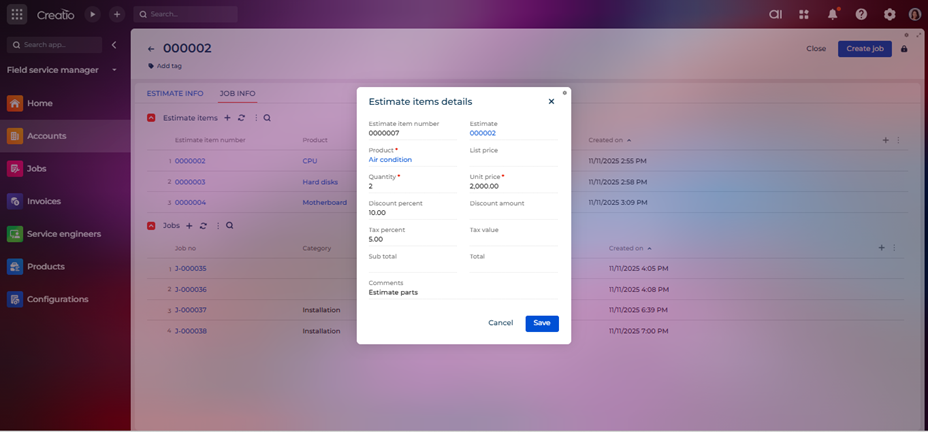
The Estimate Items entity contains the detailed list of individual services, parts, or tasks included in an estimate. Each item represents a specific component of the overall estimate, along with associated quantities, rates, and costs.

<figure><img src="https://794987320-files.gitbook.io/~/files/v0/b/gitbook-x-prod.appspot.com/o/spaces%2F-MCRVg-TYx3gVa2Tqtf_%2Fuploads%2FhD600awoIFsJMMAvWSyG%2Fimage.png?alt=media&#x26;token=93eac9a7-63d0-41be-848f-ee296569022d" alt=""><figcaption></figcaption></figure>

**Field List and Descriptions**

<table data-header-hidden><thead><tr><th width="83" valign="bottom"></th><th width="194" valign="bottom"></th><th valign="bottom"></th></tr></thead><tbody><tr><td valign="bottom"><strong>Sr. No.</strong></td><td valign="bottom"><strong>Field Name</strong></td><td valign="bottom"><strong>Short Description</strong></td></tr><tr><td valign="bottom">1</td><td valign="bottom">Estimate item number</td><td valign="bottom">Auto generated unique number for each estimate items.</td></tr><tr><td valign="bottom">2</td><td valign="bottom">Estimate</td><td valign="bottom">Lookup field to determine the associated estimate.</td></tr><tr><td valign="bottom">3</td><td valign="bottom">Product</td><td valign="bottom">Lookup field for product which is added as estimate item.</td></tr><tr><td valign="bottom">4</td><td valign="bottom">List price</td><td valign="bottom">Shows list price of product upon saving the record.</td></tr><tr><td valign="bottom">5</td><td valign="bottom">Quantity</td><td valign="bottom">The quantity field specifies the number of units for a particular item or service included in the estimate.</td></tr><tr><td valign="bottom">6</td><td valign="bottom">Unit price</td><td valign="bottom">The unit price field specifies the cost per single unit of the item or service included in the estimate.</td></tr><tr><td valign="bottom">7</td><td valign="bottom">Discount percentage</td><td valign="bottom">The discount percentage field allows users to apply a reduction to the cost of a specific item or service in the estimate.</td></tr><tr><td valign="bottom">8</td><td valign="bottom">Discount amount</td><td valign="bottom">The discount amount field shows the monetary value of the discount applied to a specific item or service in the estimate.</td></tr><tr><td valign="bottom">9</td><td valign="bottom">Tax percentage</td><td valign="bottom">The tax percentage field specifies the rate of tax applicable to a particular item or service in the estimate.</td></tr><tr><td valign="bottom">10</td><td valign="bottom">Tax value</td><td valign="bottom">The tax value field represents the monetary amount of tax applied to a specific item or service in the estimate.</td></tr><tr><td valign="bottom">11</td><td valign="bottom">Sub total</td><td valign="bottom">The subtotal field represents the total cost of an item before applying discounts and taxes.</td></tr><tr><td valign="bottom">12</td><td valign="bottom">Total</td><td valign="bottom">The total figure represents the final cost of an item after applying discounts and taxes.</td></tr><tr><td valign="bottom">13</td><td valign="bottom">Comments</td><td valign="bottom">Display additional comments for estimated item.</td></tr></tbody></table>