> For the complete documentation index, see [llms.txt](https://docs.greytrix.com/llms.txt). Markdown versions of documentation pages are available by appending `.md` to page URLs; this page is available as [Markdown](https://docs.greytrix.com/gumu-tm-for-sage-300-integration/woocommerce/gumu-tm-portal-user/required-configurations/integration-configuration.md).

# Integration Configuration

<mark style="color:$danger;">**Configuration of GUMU™ Integration connector:**</mark>

**Integration configurator** – In this setting page, user will need to set the default connector setting which will be used by the connector at the time of integration process. This setting defined in this section will be used by the connector to communicate between the 2 system efficiently.

<figure><img src="/files/KB1Y3lthL7n3bc9bjL2k" alt=""><figcaption></figcaption></figure>

<table data-header-hidden="false" data-header-sticky data-full-width="true"><thead><tr><th width="174.66668701171875">Field</th><th>Description</th></tr></thead><tbody><tr><td>Connector Name</td><td>Specifies the name of the integration connector used to link <strong>Sage 300c</strong> with <strong>WooCommerce</strong>. This helps identify the specific integration configuration used for synchronizing data such as customers, products, and orders.</td></tr><tr><td>Customer</td><td>Automatically generated incremental Customer ID</td></tr><tr><td>Email</td><td>Specifies the <strong>email address where integration notifications, error alerts, and execution reports will be sent</strong>. This helps administrators monitor the integration process and quickly respond to any issues.</td></tr><tr><td>Log send on</td><td>Defines the <strong>frequency or schedule for sending integration logs</strong> (e.g., daily, weekly, or after each integration run). This ensures regular monitoring and reporting of integration activities and errors.</td></tr></tbody></table>

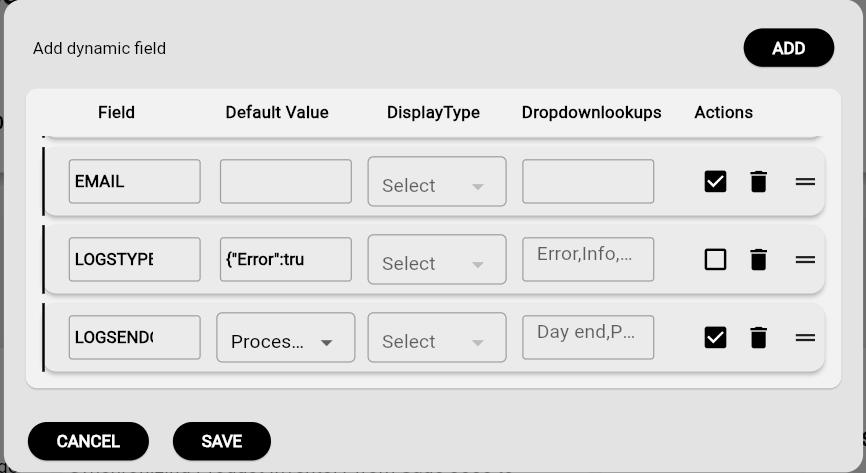
<mark style="color:$danger;">**Customize Integration Configuration for your Connector**</mark>

You can configure the integration settings based on your business requirements and system setup to ensure smooth data synchronization between the connected systems.

<figure><img src="/files/fEIoy2UNoJISCt9iJIg6" alt=""><figcaption></figcaption></figure>

<figure><img src="/files/xqznTMFXOzlTZl4Kawzm" alt=""><figcaption></figcaption></figure>


---

# Agent Instructions
This documentation is published with GitBook. GitBook is the documentation platform designed so that both humans and AI agents can read, navigate, and reason over technical content effectively. Learn more at gitbook.com.

## Querying This Documentation
If you need additional information that is not directly available in this page, you can query the documentation dynamically by asking a question.

Perform an HTTP GET request on the current page URL with the `ask` query parameter:

```
GET https://docs.greytrix.com/gumu-tm-for-sage-300-integration/woocommerce/gumu-tm-portal-user/required-configurations/integration-configuration.md?ask=<question>
```

The question should be specific, self-contained, and written in natural language.
The response will contain a direct answer to the question and relevant excerpts and sources from the documentation.

Use this mechanism when the answer is not explicitly present in the current page, you need clarification or additional context, or you want to retrieve related documentation sections.