> For the complete documentation index, see [llms.txt](https://docs.greytrix.com/llms.txt). Markdown versions of documentation pages are available by appending `.md` to page URLs; this page is available as [Markdown](https://docs.greytrix.com/gumu-salesforce-integration/sagex3/transaction/account.md).

# Account Creation and Promotion

* It is mandatory to synchronize some required entities such as Category, Currency, Language, Payment Terms, and Tax Rules before promoting a Customer to the Sage X3.
* One of the most significant points the user needs to keep in mind while making changes for Accounts, Addresses, etc. in Salesforce is that the Sage X3 record for that Account should not be open i.e., in edit or read-only mode, otherwise the real-time changes will not be reflected from Salesforce to Sage X3.&#x20;

1. Click on the Accounts tab, click the **New** button (top right), fill in all the required details and then **Save.**&#x20;

**Note:** Fill in the Shipping Address and Billing Address details, then only the Account will be promoted from Salesforce to ERP or else it will show an error.

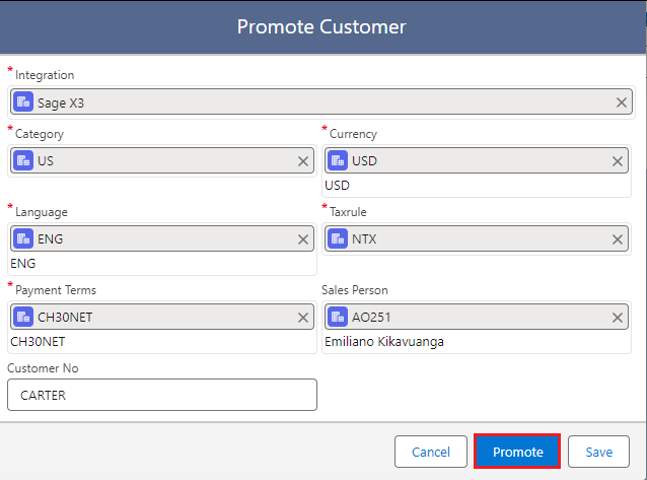
2. Click the **Promote Customer** button to promote the Account in Sage X3 (this navigates to a screen for selecting the integration or it will display the default integration if one has been set).

<figure><img src="/files/M4UbPoOKcOnqvxPHbvRr" alt=""><figcaption></figcaption></figure>

<figure><img src="/files/haz2ZpYXg4qp2fxSh4xp" alt=""><figcaption></figcaption></figure>

### <mark style="color:red;">**Promote Customer Details**</mark>

<table><thead><tr><th width="180">Field</th><th>Description</th></tr></thead><tbody><tr><td>Integration</td><td>Specify the configured Integration name if the default integration is not set or selected by default</td></tr><tr><td>Category</td><td>Specify the default category to be used for the customer based on your business scenario</td></tr><tr><td>Currency</td><td>Specify the default Currency to be used for the customer based on your business scenario</td></tr><tr><td>Language</td><td>It auto populates the default Language which had been set during the Configuration setup</td></tr><tr><td>Taxrule</td><td>Specify the default Tax rule to be used for the customer based on your business scenario</td></tr><tr><td>Payment Terms</td><td>Specify the default Payment Terms to be used for the customer based on your business scenario</td></tr><tr><td>Salesperson</td><td>Specify the Salesperson, to be used for the customer record based on your setting in the Sage system</td></tr><tr><td>Customer No</td><td>Specify the non-existing “Customer No”. to be used for the customer record based on your business scenario</td></tr></tbody></table>

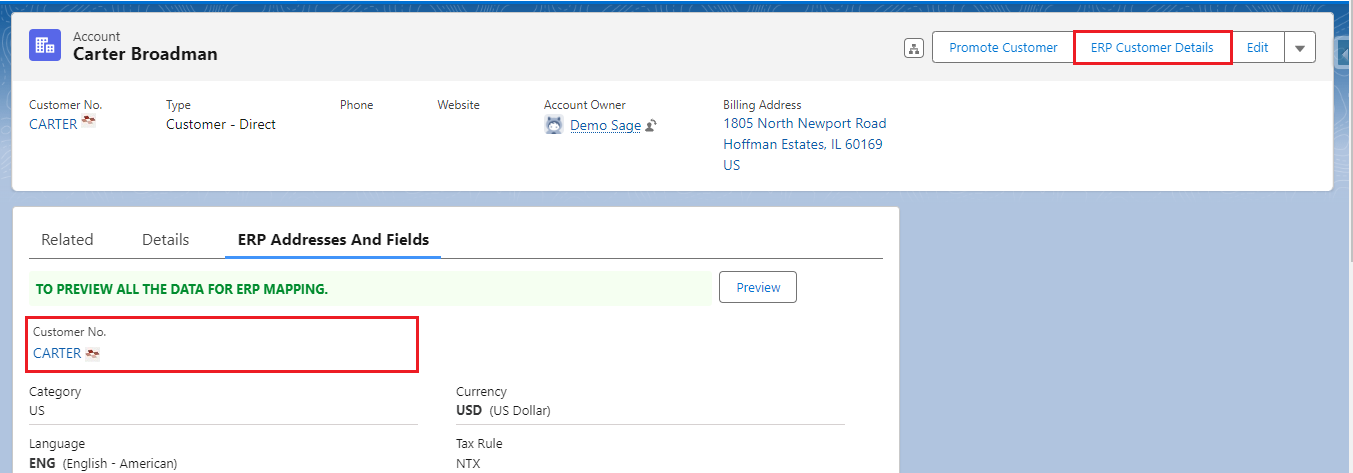
3. Navigate to the **ERP Addresses and Fields** tab to view the promoted Customer details (once an account gets promoted the Integration key and External UID will be generated).

<figure><img src="/files/EDDxZt6fsIrOzpfbcVIe" alt=""><figcaption></figcaption></figure>

4. To verify if an Customer is promoted, click on the **Customer No.** link or **ERP Customer Details** button and it will display the real-time details (or you can log in to the Sage System and check for the specific record).

<figure><img src="/files/5R0a4AURkGKUmF47d2Oo" alt=""><figcaption></figcaption></figure>

<figure><img src="/files/NvebFyspYk7hCnqWHmTc" alt=""><figcaption><p>Real-Time details of Customer in Salesforce</p></figcaption></figure>

<figure><img src="/files/aYEkIaq4qOa8KpnbcYbV" alt=""><figcaption><p>Promoted X3 Customer Details</p></figcaption></figure>


---

# Agent Instructions
This documentation is published with GitBook. GitBook is the documentation platform designed so that both humans and AI agents can read, navigate, and reason over technical content effectively. Learn more at gitbook.com.

## Querying This Documentation
If you need additional information that is not directly available in this page, you can query the documentation dynamically by asking a question.

Perform an HTTP GET request on the current page URL with the `ask` query parameter, and the optional `goal` query parameter:

```
GET https://docs.greytrix.com/gumu-salesforce-integration/sagex3/transaction/account.md?ask=<question>&goal=<endgoal>
```

`ask` is the immediate question: it should be specific, self-contained, and written in natural language.
`goal` is optional and describes the broader end goal you are ultimately trying to accomplish on behalf of the user. GitBook uses it to tailor the answer towards what is most useful for that goal.

The response will contain a direct answer to the question and relevant excerpts and sources from the documentation.

Use this mechanism when the answer is not explicitly present in the current page, you need clarification or additional context, or you want to retrieve related documentation sections.