# Unlink Account

One of the GUMU‘s™ features is that you can remove linking between already linked Salesforce Accounts and Sage Customers. This can be done if you no longer want to keep the relationship between two Accounts/Customers or want to break all transactions that work in real-time. After unlinking, you will not be able to access real-time ERP data, create a Sales Order, or conduct any other transactions.

To Unlink an account, follow the steps below:

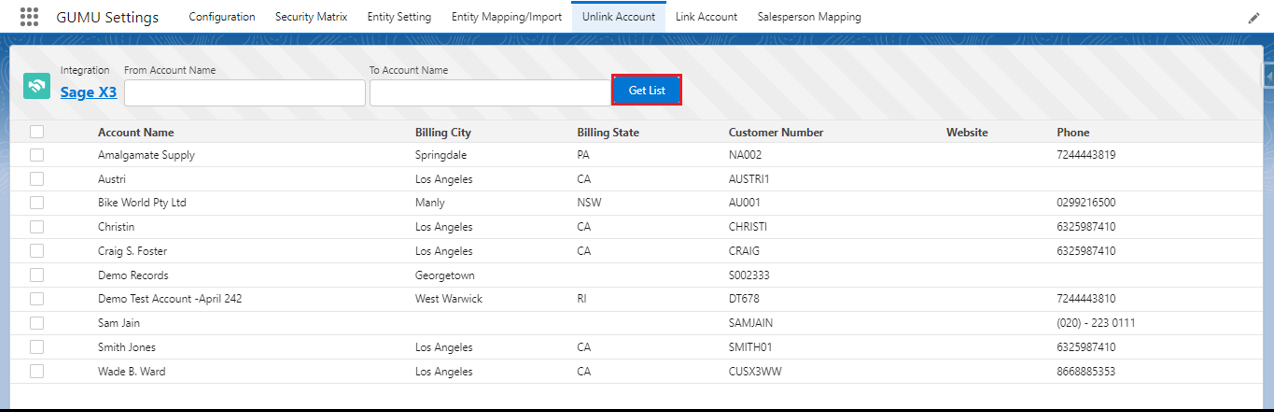
1. Navigate to the **GUMU™ Settings** app and then click on the **Unlink Account** tab.

<figure><img src="/files/5N25gnlhDwH0BsUhvJnA" alt=""><figcaption></figcaption></figure>

### <mark style="color:red;">**Unlink Account Filters**</mark>

<table><thead><tr><th width="241">Filter</th><th>Detail</th></tr></thead><tbody><tr><td>Integration</td><td>It will specify the configured Sage ERP Integration to get the Salesforce Account list related to integration.</td></tr><tr><td>From Account Name</td><td>Provide From Account Name for Salesforce (Start Name) to get the list of Salesforce Accounts.</td></tr><tr><td>To Account Name</td><td>Provide To Account Name for Salesforce (End Name) to get the list of Salesforce Accounts.</td></tr></tbody></table>

2. Click the **Get List** button and the list of linked Accounts/Customers will be populated in the grid.

<figure><img src="/files/zdqcTS5auq9V3BQF2S3N" alt=""><figcaption></figcaption></figure>

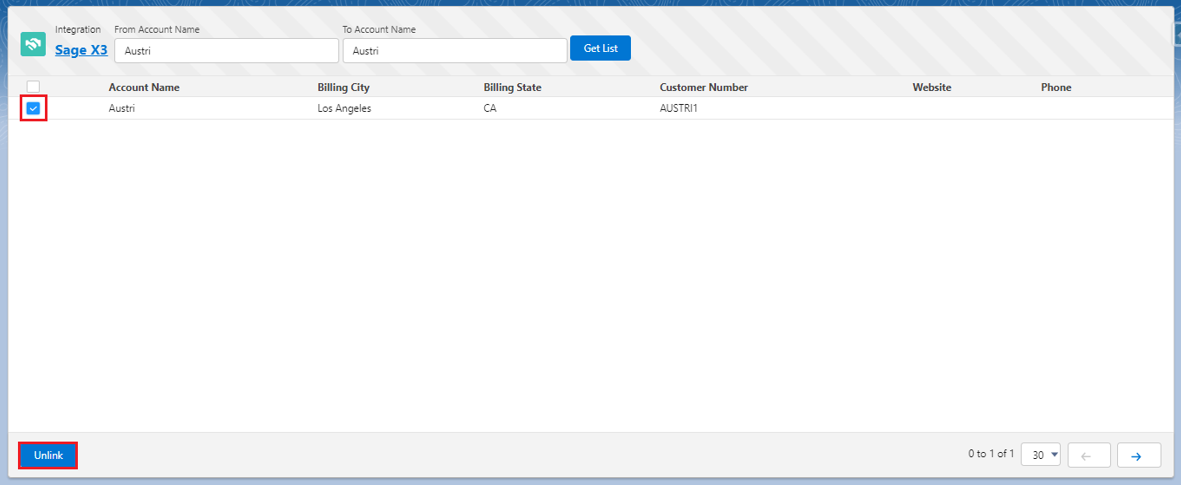
3. To find a particular Account you can search in the **From Account Name** and **To Account Name** fields.

<figure><img src="/files/vl6v0iF2K7H8yx9Svkzs" alt=""><figcaption></figcaption></figure>

4. Select the Account(s) from the list and click the **Unlink** button to remove the link for the selected Sage Account(s).

<figure><img src="/files/9FzoxpZbmPepX3dmldE1" alt=""><figcaption></figcaption></figure>

In this way, the user can remove the link between the Salesforce Account and Sage X3 Customer.


---

# Agent Instructions: Querying This Documentation

If you need additional information that is not directly available in this page, you can query the documentation dynamically by asking a question.

Perform an HTTP GET request on the current page URL with the `ask` query parameter:

```
GET https://docs.greytrix.com/gumu-salesforce-integration/sagex3/gumu-tm-settings/unlink-account.md?ask=<question>
```

The question should be specific, self-contained, and written in natural language.
The response will contain a direct answer to the question and relevant excerpts and sources from the documentation.

Use this mechanism when the answer is not explicitly present in the current page, you need clarification or additional context, or you want to retrieve related documentation sections.