> For the complete documentation index, see [llms.txt](https://docs.greytrix.com/llms.txt). Markdown versions of documentation pages are available by appending `.md` to page URLs; this page is available as [Markdown](https://docs.greytrix.com/gumu-salesforce-integration/sagex3/gumu-tm-settings/salesperson-mapping.md).
# Salesperson Mapping
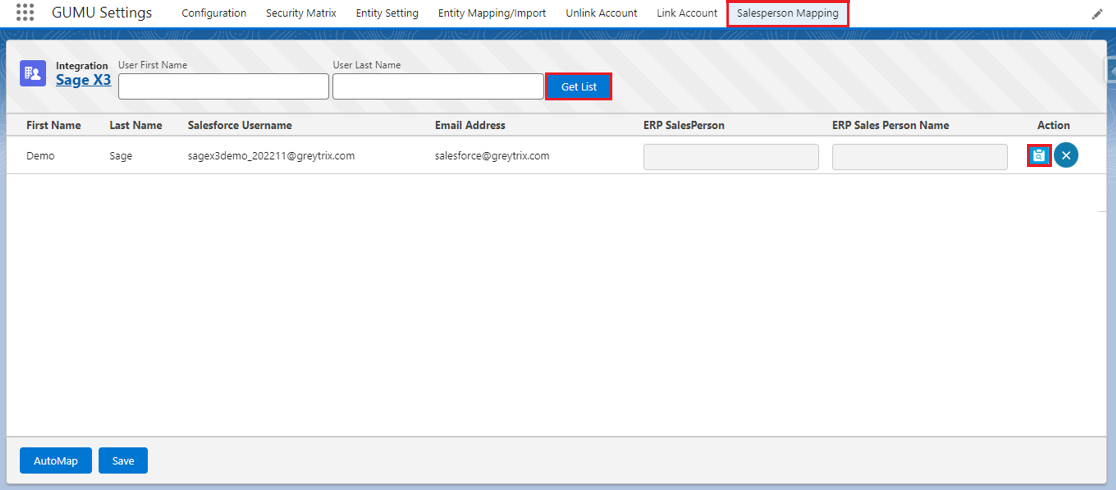
The Salesperson Mapping screen allows you to link a Salesperson in Sage to a Salesforce User, so that the linked Salesperson will be automatically set as the default Salesperson for that specific Salesforce user.
1. Navigate to the **GUMU™ Settings** app and then click on the **Salesperson Mapping** tab.
2. You can enter filter values for **User First Name** or **User Last Name** and click the **Get List** button or you can directly click on **Get List** to view the Salesperson list. Click the **blue clipboard icon** under the Action panel.
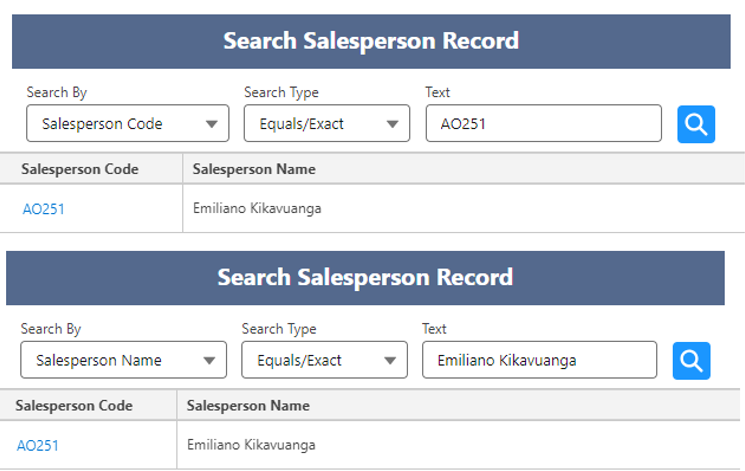
3. Select the Salesperson from the Search Salesperson Record screen (you can search the Salesperson based on Name or Code), and click the **Salesperson Code** to select.
4. Click on the **Save** button to map the Salesperson.