# Package Installation
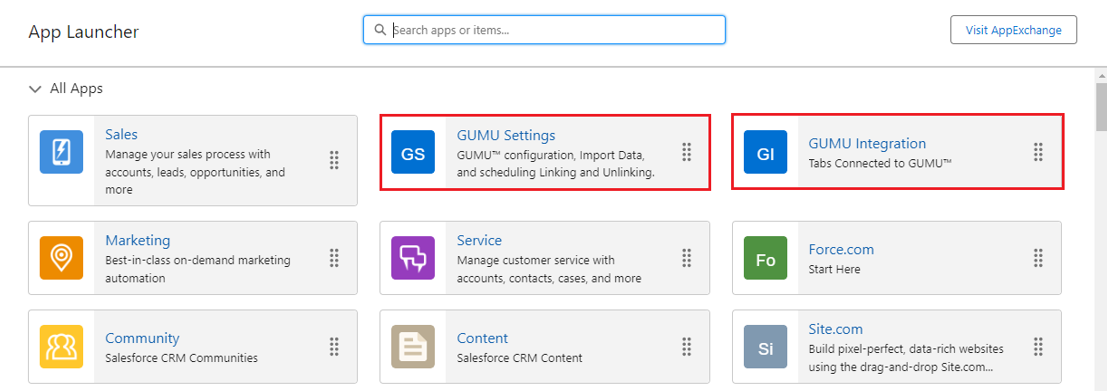
Now that you have completed your pre-installation checklist and installed the Patch, you can either obtain the package link from the App Exchange, or we can manage the installation process on your behalf. Once the **GUMU™** package has been installed successfully within Salesforce, you will find two new applications that can be accessed via the App Launcher. These applications include **GUMU™ Settings**, which is focused on configuration, and **GUMU™ Integration**, designed to improve the user experience. To begin the installation of the package, please follow the steps in our guide below.
Ready for the Package Installation? Once you have your pre-installation checklist complete and Patch installed, follow our step by step guide.
1. Enter your username and password for the Salesforce organization in which you want to install the package, and then click **Log In.**
2. To allow users to create a Quote and email a PDF of the quote to customers, we need to enable the Quotes from the Quotes setting, in the Quick Find box, search for Quote, and then click on the **Enable Quotes** checkbox.
3. A new page will appear to select the page layout.
3. After logging, Into the browser, navigate to the URL and paste the **Sage Intacct** package URL provided by the team Greytrix, and hit “Enter” on your keyboard.
4. You will be navigated to the Install GUMU™ Installation screen, click on the **Install for All Users** and click **Install.**
4. Once the package installation is completed for Gumu Intacct, proceed ahead with similar steps to install the **GUMU™ Integration** and Quote to Order Flow package package.
**Additional Packages to be installed:**
* Last Sync Update Flow
* Log Deletion Flow
5. Upon Package installation, 2 GUMU™ applications will appear in the App Launcher of Salesforce