# Security Matrix

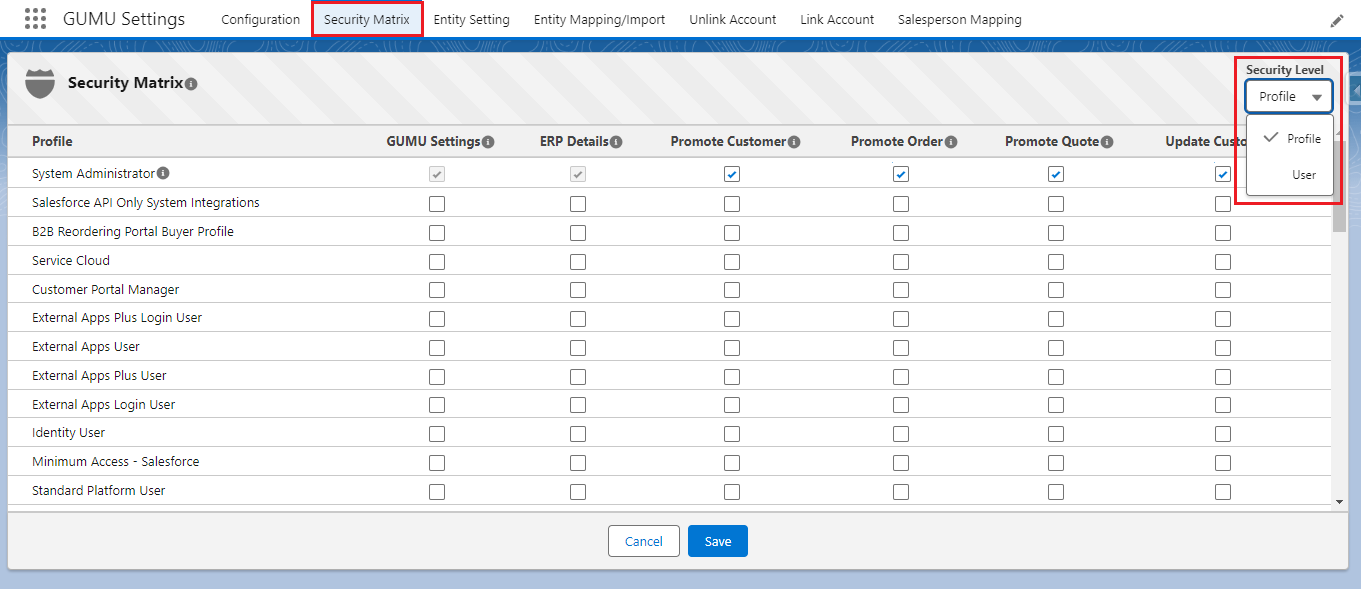
The Security Matrix screen is where you manage access rights for the different integration features. These can be set for specific Salesforce Profiles or by User.

**Note**: Even if the access rights for a screen are modified in the Security Matrix, a user with a System Administrator profile will still have default access to the screen due to their administrative privileges.

1. Navigate to the **GUMU™ Settings** application and the Administration page to access the **Security Matrix** tab.
2. Click on the Security Matrix tab to set up the Integration screen’s access rights (allow/deny) to specific Salesforce Profiles or Users.

<figure><img src="https://794987320-files.gitbook.io/~/files/v0/b/gitbook-x-prod.appspot.com/o/spaces%2F-MCRVg-TYx3gVa2Tqtf_%2Fuploads%2FIivFflz4AJxu6NGiNMfY%2Fimage.png?alt=media&#x26;token=b031eea0-5b19-4804-aa12-41df46adf908" alt=""><figcaption></figcaption></figure>

### <mark style="color:red;">**Profile vs. User**</mark> <a href="#profile-vs.-user" id="profile-vs.-user"></a>

<table><thead><tr><th width="210">Security Level</th><th>Detail</th></tr></thead><tbody><tr><td>Profile</td><td>Profiles are listed in the grid allowing the administrator to allow/deny access for each Profile type (users under that Profile will have the same rights.</td></tr><tr><td>User</td><td>Users are listed in the grid allowing the administrator to allow/deny access for each User by name.</td></tr></tbody></table>

Following are the typical GUMU™ functional access which are maintained or provide access to the **User** or **Profiles** through the Security Matrix by **Salesforce Admin*****.***

#### Functional Access <a href="#functional-access" id="functional-access"></a>

| Category         | Description                                                                                                                                                                                                                             |
| ---------------- | --------------------------------------------------------------------------------------------------------------------------------------------------------------------------------------------------------------------------------------- |
| GUMU Settings    | For a particular User/Profile, the Salesforce Administrator can provide access to the GUMU™ Settings App by checking the checkbox (if the checkbox is left unchecked then that User/Profile will not have access to the GUMU™ Settings) |
| ERP Details      | If the ERP Details checkbox is left unchecked for a particular User/Profile they will not be able to access the real-time data (Sales Order, AR Inquiry and Customer information) for the Accounts                                      |
| Promote Customer | If this checkbox is left unchecked for a User/Profile they will not be allowed to promote the Accounts from Salesforce as Customers to Sage                                                                                             |
| Promote Order    | If this checkbox is unchecked for a User/Profile they will not be allowed to promote Orders from Salesforce to Sage.                                                                                                                    |
| Promote Quote    | If this checkbox is unchecked for a User/Profile they will not be allowed to promote Quotes from Salesforce to Sage.                                                                                                                    |
| Update Customer  | If this checkbox is unchecked for a User/Profile they will not be allowed to pass on the update of a linked (Promoted) Account record to the Customer in Sage.                                                                          |

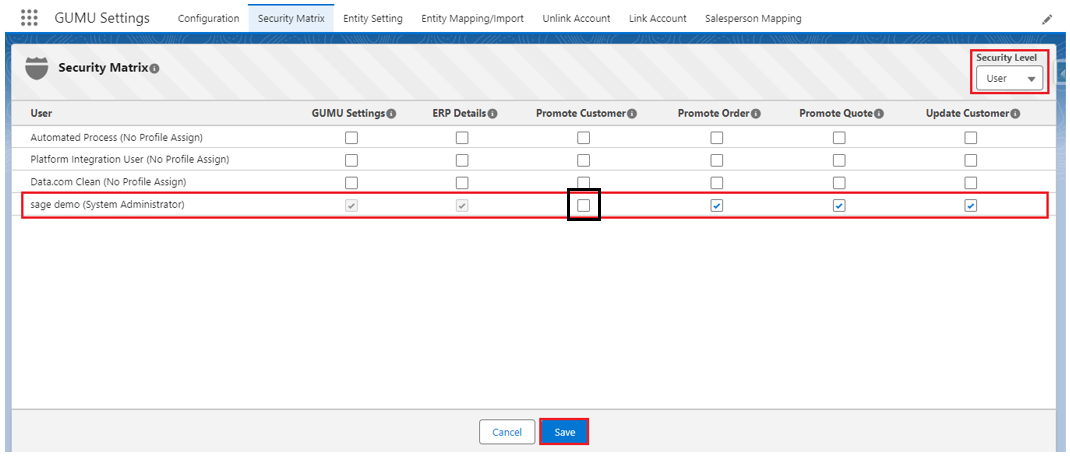
3. Here is an example: the System Administrator has provided the user, ***Sage Demo*****,** to access only five Modules (GUMU Settings, ERP Details, Promote Order, Promote Quote, and Update Customer) when the user logs into Salesforce and tries to Promote a Customer, they are not allowed.

<figure><img src="https://794987320-files.gitbook.io/~/files/v0/b/gitbook-x-prod.appspot.com/o/spaces%2F-MCRVg-TYx3gVa2Tqtf_%2Fuploads%2FJqG8s4vaJiMBBJiYEHmk%2Fimage.png?alt=media&#x26;token=dc897ab0-a1cb-4002-9427-4cbd38b1639e" alt=""><figcaption></figcaption></figure>

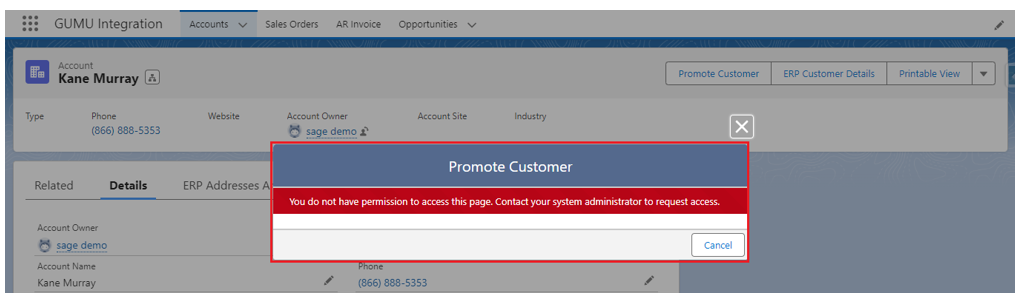
4. The following error message will be displayed when trying to Promote a Customer without rights: “***You do not have permission to access this page. Contact your system administrator to request access.***”

<figure><img src="https://794987320-files.gitbook.io/~/files/v0/b/gitbook-x-prod.appspot.com/o/spaces%2F-MCRVg-TYx3gVa2Tqtf_%2Fuploads%2FRUbcsg2m5uWX6wgMllrp%2Fimage.png?alt=media&#x26;token=ea1502f9-bfce-40bf-9b9b-7a33a18bff76" alt=""><figcaption></figcaption></figure>