> For the complete documentation index, see [llms.txt](https://docs.greytrix.com/llms.txt). Markdown versions of documentation pages are available by appending `.md` to page URLs; this page is available as [Markdown](https://docs.greytrix.com/gumu-sage-crm-integration/sage-x3/user-guide/sage-crm-side-gumu-administration/enabling-gumu-integration-access-to-each-sage-crm-user.md).
# Enabling GUMU™ Integration access to each Sage CRM user
Before enabling GUMU™ Integration access to each Sage CRM user, kindly refresh the metadata.
Once GUMU™ integration is installed, the Sage CRM system administrator needs to decide which Sage CRM users will have access to GUMU™ integration.
For example, if you have purchased a total of 5 user license from Greytrix for GUMU™ integration then you will have to provide enable those 5 users as given below.
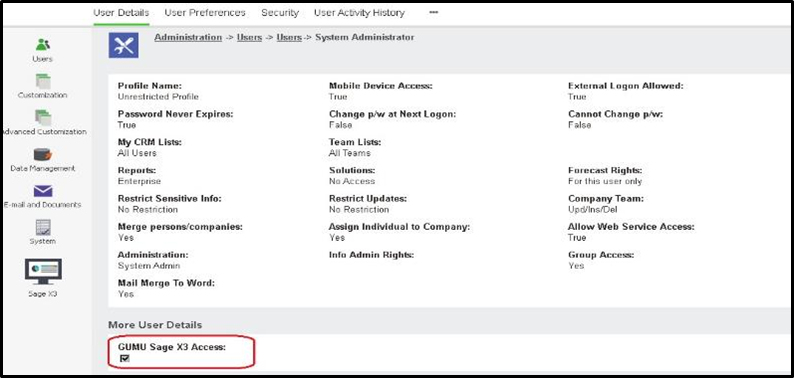
1. In Sage CRM, Administration -> Users -> select the user for which you want to enable integration access.
2. Check the GUMU™ Sage X3 Access checkbox as mentioned in the below screen.
3. This will enable a particular user to access GUMU™ integration.
4. Repeat the above steps for all the CRM users for which you want to enable GUMU™ integration access.\