> For the complete documentation index, see [llms.txt](https://docs.greytrix.com/llms.txt). Markdown versions of documentation pages are available by appending `.md` to page URLs; this page is available as [Markdown](https://docs.greytrix.com/gumu-sage-crm-integration/sage-intacct/user-guide/sage-intacct-gumu-administration/synchronize-dropdowns.md).
# Synchronize Dropdowns
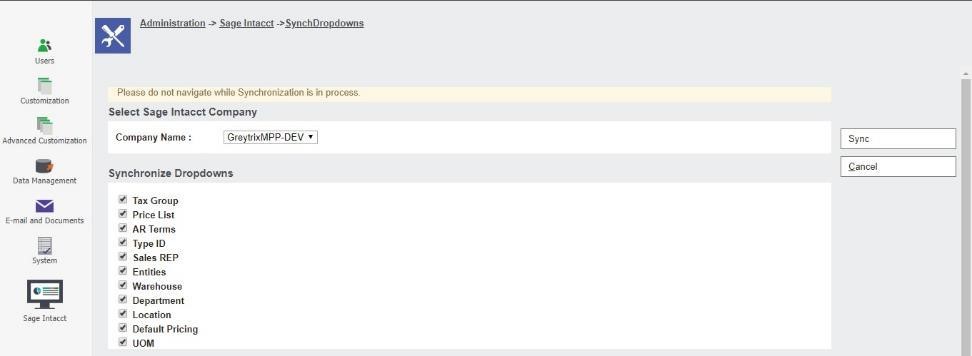
To synchronize the option values of the Dropdown fields from Sage Intacct the user can follow the below steps**:**
1. Select **Administration Sage Intacct Synchronize Dropdown**. The page is displayed.\
2. There will be below options which you can sync by clicking on **Sync** Button.
3. Sync Options:
* Tax Group
* Price List
* AR Terms
* Type ID
* Sales REP
* Entities
* Warehouse
* Department
* Locations
* Default Pricing
* UOM
4. Refresh Sage CRM Metadata