> For the complete documentation index, see [llms.txt](https://docs.greytrix.com/llms.txt). Markdown versions of documentation pages are available by appending `.md` to page URLs; this page is available as [Markdown](https://docs.greytrix.com/gumu-sage-crm-integration/sage-intacct/installation-guide/steps-to-be-followed-after-gumu-setup-installation/ship-via-setting.md).
# Ship Via Setting
1. Shipping Method setting should be done as per Sage Intacct
2. For setting up in Sage CRM, follow the below steps
1. Go to Administration –> Customization -> Orders.
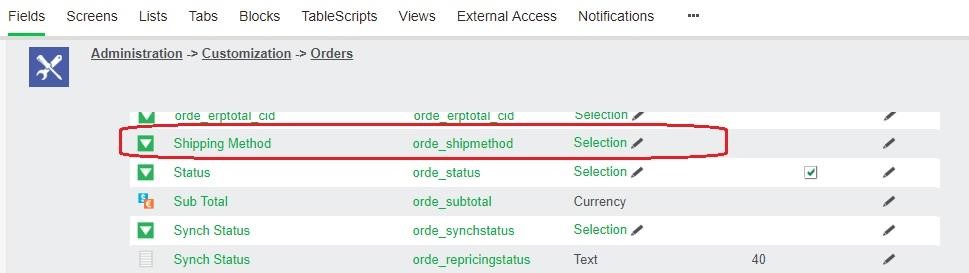
2. In the Fields Tab click on the selection field type for Shipping Method field.
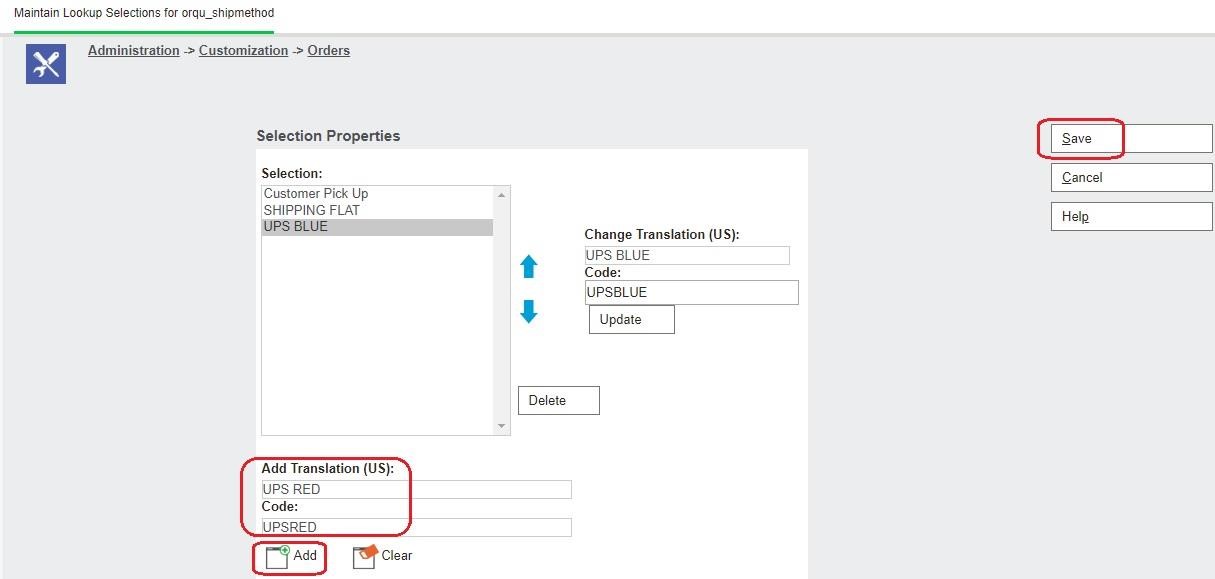
3. Create a new Shipping Method name by adding the code and translation. Here you need to be sure that the shipping name specified matches with as per Sage Intacct.
4. Click on Add to add the Shipping Method in the list. Refer below screenshot.