# Assignments

A single job can have multiple assignments, allowing different technicians or resources to be scheduled for the same job. This is useful when the job requires more than one skill set, multiple visits, or additional support from other team members.

Each assignment is recorded separately and can have its own scheduled start time, end time, and assigned technician. This gives dispatchers full flexibility in planning and ensures all required resources are allocated efficiently.

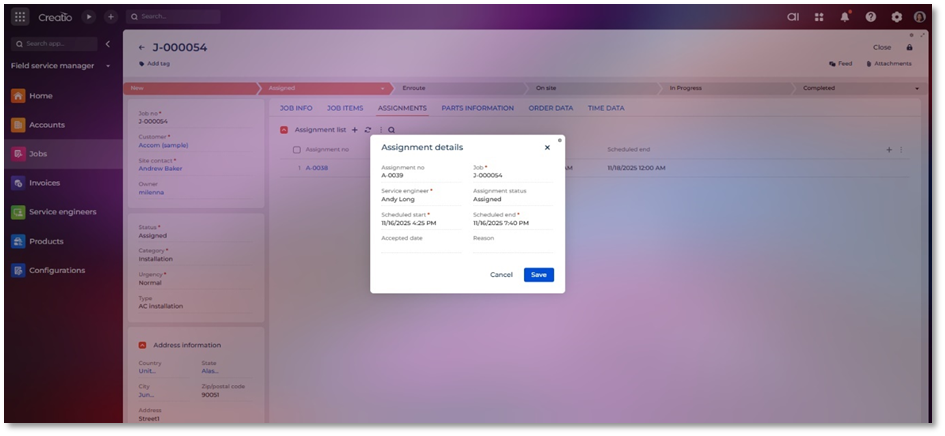
<figure><img src="https://794987320-files.gitbook.io/~/files/v0/b/gitbook-x-prod.appspot.com/o/spaces%2F-MCRVg-TYx3gVa2Tqtf_%2Fuploads%2FzLmOAHNvRcrdIxDUt93u%2Fimage.png?alt=media&#x26;token=4c8a68e8-0b78-49f2-a115-2d3e520e748f" alt=""><figcaption></figcaption></figure>

**Field List and Descriptions**

<table data-header-hidden><thead><tr><th width="75" valign="bottom"></th><th width="152" valign="bottom"></th><th valign="bottom"></th></tr></thead><tbody><tr><td valign="bottom"><strong>Sr. No.</strong></td><td valign="bottom"><strong>Field Name</strong></td><td valign="bottom"><strong>Short Description</strong></td></tr><tr><td valign="bottom">1</td><td valign="bottom">Assignment no</td><td valign="bottom">Auto generated unique number for each assignment.</td></tr><tr><td valign="bottom">2</td><td valign="bottom">Job</td><td valign="bottom">Lookup field to job for which assignment is added.</td></tr><tr><td valign="bottom">3</td><td valign="bottom">Service engineer</td><td valign="bottom">Lookup field for service engineer which is assigned to assignment.</td></tr><tr><td valign="bottom">4</td><td valign="bottom">Reason</td><td valign="bottom">The Reason field on an assignment is used to capture the purpose or context behind why a particular technician or resource has been assigned, rescheduled, or updated on a job.</td></tr><tr><td valign="bottom">5</td><td valign="bottom">Status</td><td valign="bottom">Display status of estimate for example accepted, assigned, rejected etc.</td></tr><tr><td valign="bottom">6</td><td valign="bottom">Scheduled Start</td><td valign="bottom">The Schedule Start field indicates the date and time when the assigned technician is planned to begin work on the job.</td></tr><tr><td valign="bottom">7</td><td valign="bottom">Scheduled End</td><td valign="bottom">The Schedule End field represents the planned date and time when the technician is expected to finish the assignment.</td></tr><tr><td valign="bottom">8</td><td valign="bottom">Accepted Date</td><td valign="bottom">The Accepted Date field captures the date and time when the technician officially acknowledges or accepts the assignment.</td></tr></tbody></table>