# Products Requested

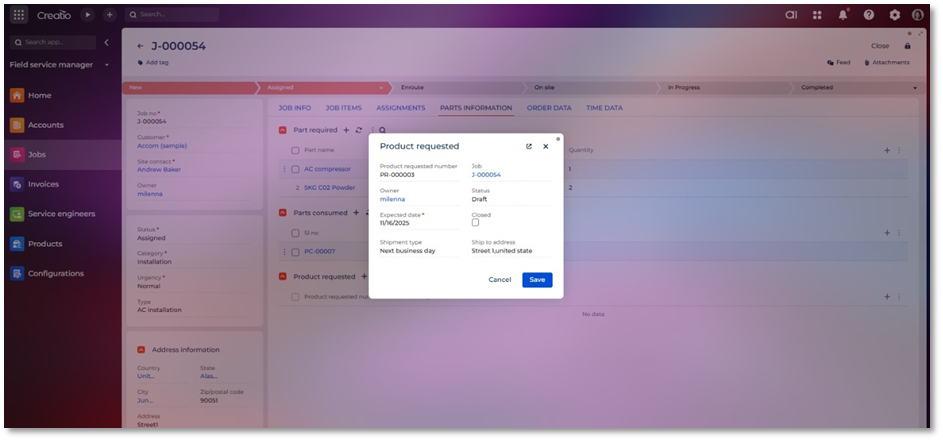
The Parts Requested entity captures the list of parts or materials that a technician or field staff has requested for a job. Unlike Parts Required, which is planned by the dispatcher or back-office team, Parts Requested reflects actual requests initiated by the field team to fulfil the job’s needs.

<figure><img src="/files/My5jbpG3ogGvOjNsxonH" alt=""><figcaption></figcaption></figure>

**Field List and Descriptions**

<table data-header-hidden><thead><tr><th width="89" valign="bottom"></th><th width="150" valign="bottom"></th><th valign="bottom"></th></tr></thead><tbody><tr><td valign="bottom"><strong>Sr. No.</strong></td><td valign="bottom"><strong>Field Name</strong></td><td valign="bottom"><strong>Short Description</strong></td></tr><tr><td valign="bottom">1</td><td valign="bottom">Product request number</td><td valign="bottom">A unique auto generated number for product request record.</td></tr><tr><td valign="bottom">2</td><td valign="bottom">Job</td><td valign="bottom">Lookup field to job for which product is consumed.</td></tr><tr><td valign="bottom">3</td><td valign="bottom">Owner</td><td valign="bottom">Creatio user who is managing the request.</td></tr><tr><td valign="bottom">4</td><td valign="bottom">Status</td><td valign="bottom">Status of product requested such as draft, received and submitted.</td></tr><tr><td valign="bottom">5</td><td valign="bottom">Expected Date</td><td valign="bottom">The Expected Date indicates the date by which the requested part is expected to be available, delivered, or ready for use on the job.</td></tr><tr><td valign="bottom">6</td><td valign="bottom">Shipment type</td><td valign="bottom">The Shipment Type field specifies the method or mode of delivery for the requested part.</td></tr><tr><td valign="bottom">7</td><td valign="bottom">Ship to address</td><td valign="bottom">The Ship to Address field specifies the location where the requested part should be delivered. This may be the job site, a technician’s location, a customer address, or a warehouse.</td></tr><tr><td valign="bottom">8</td><td valign="bottom">Closed?</td><td valign="bottom">The Closed field indicates whether the parts request has been fully completed and is no longer active.</td></tr></tbody></table>


---

# Agent Instructions: Querying This Documentation

If you need additional information that is not directly available in this page, you can query the documentation dynamically by asking a question.

Perform an HTTP GET request on the current page URL with the `ask` query parameter:

```
GET https://docs.greytrix.com/creatio-add-ons/field-service-manager-for-creatio/user-guide/jobs/related-entities/products-requested.md?ask=<question>
```

The question should be specific, self-contained, and written in natural language.
The response will contain a direct answer to the question and relevant excerpts and sources from the documentation.

Use this mechanism when the answer is not explicitly present in the current page, you need clarification or additional context, or you want to retrieve related documentation sections.