> For the complete documentation index, see [llms.txt](https://docs.greytrix.com/llms.txt). Markdown versions of documentation pages are available by appending `.md` to page URLs; this page is available as [Markdown](https://docs.greytrix.com/creatio-add-ons/field-service-manager-for-creatio/user-guide/accounts/estimates/estimate-items.md).

# Estimate Items

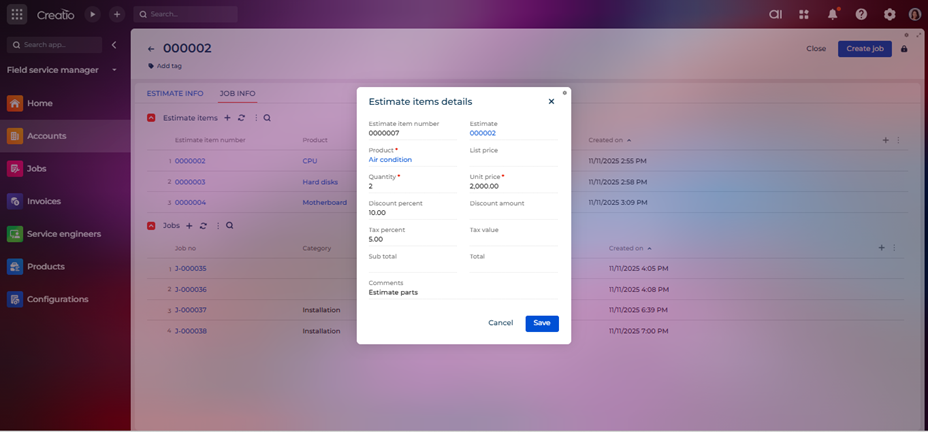
The Estimate Items entity contains the detailed list of individual services, parts, or tasks included in an estimate. Each item represents a specific component of the overall estimate, along with associated quantities, rates, and costs.

<figure><img src="/files/RK5D8V9sJ5rCsxn041pI" alt=""><figcaption></figcaption></figure>

**Field List and Descriptions**

<table data-header-hidden><thead><tr><th width="83" valign="bottom"></th><th width="194" valign="bottom"></th><th valign="bottom"></th></tr></thead><tbody><tr><td valign="bottom"><strong>Sr. No.</strong></td><td valign="bottom"><strong>Field Name</strong></td><td valign="bottom"><strong>Short Description</strong></td></tr><tr><td valign="bottom">1</td><td valign="bottom">Estimate item number</td><td valign="bottom">Auto generated unique number for each estimate items.</td></tr><tr><td valign="bottom">2</td><td valign="bottom">Estimate</td><td valign="bottom">Lookup field to determine the associated estimate.</td></tr><tr><td valign="bottom">3</td><td valign="bottom">Product</td><td valign="bottom">Lookup field for product which is added as estimate item.</td></tr><tr><td valign="bottom">4</td><td valign="bottom">List price</td><td valign="bottom">Shows list price of product upon saving the record.</td></tr><tr><td valign="bottom">5</td><td valign="bottom">Quantity</td><td valign="bottom">The quantity field specifies the number of units for a particular item or service included in the estimate.</td></tr><tr><td valign="bottom">6</td><td valign="bottom">Unit price</td><td valign="bottom">The unit price field specifies the cost per single unit of the item or service included in the estimate.</td></tr><tr><td valign="bottom">7</td><td valign="bottom">Discount percentage</td><td valign="bottom">The discount percentage field allows users to apply a reduction to the cost of a specific item or service in the estimate.</td></tr><tr><td valign="bottom">8</td><td valign="bottom">Discount amount</td><td valign="bottom">The discount amount field shows the monetary value of the discount applied to a specific item or service in the estimate.</td></tr><tr><td valign="bottom">9</td><td valign="bottom">Tax percentage</td><td valign="bottom">The tax percentage field specifies the rate of tax applicable to a particular item or service in the estimate.</td></tr><tr><td valign="bottom">10</td><td valign="bottom">Tax value</td><td valign="bottom">The tax value field represents the monetary amount of tax applied to a specific item or service in the estimate.</td></tr><tr><td valign="bottom">11</td><td valign="bottom">Sub total</td><td valign="bottom">The subtotal field represents the total cost of an item before applying discounts and taxes.</td></tr><tr><td valign="bottom">12</td><td valign="bottom">Total</td><td valign="bottom">The total figure represents the final cost of an item after applying discounts and taxes.</td></tr><tr><td valign="bottom">13</td><td valign="bottom">Comments</td><td valign="bottom">Display additional comments for estimated item.</td></tr></tbody></table>


---

# Agent Instructions
This documentation is published with GitBook. GitBook is the documentation platform designed so that both humans and AI agents can read, navigate, and reason over technical content effectively. Learn more at gitbook.com.

## Querying This Documentation
If you need additional information that is not directly available in this page, you can query the documentation dynamically by asking a question.

Perform an HTTP GET request on the current page URL with the `ask` query parameter:

```
GET https://docs.greytrix.com/creatio-add-ons/field-service-manager-for-creatio/user-guide/accounts/estimates/estimate-items.md?ask=<question>
```

The question should be specific, self-contained, and written in natural language.
The response will contain a direct answer to the question and relevant excerpts and sources from the documentation.

Use this mechanism when the answer is not explicitly present in the current page, you need clarification or additional context, or you want to retrieve related documentation sections.